Function Declaration vs Function Expression: What’s the Difference?
Function Declaration vs Function Expression — explained through directors, actors, and a film set that keeps crashing

Turning chai into code and ideas into full-stack applications. Sharing lessons from my development journey, one commit at a time.
The Movie Studio That Taught Me JavaScript Functions 🎬
It's your second week at the studio.
Not a film studio — a software studio. But your tech lead Madhav has a thing for movie metaphors, and today he's about to use one that's going to change how you understand JavaScript functions forever.
You're staring at a bug. The console says:
ReferenceError: actor is not a function
The code looks fine to you. There's a function right there. You can see it. Why is JavaScript pretending it doesn't exist?
Madhav rolls his chair over, looks at your screen for exactly three seconds, and says:
"You hired a freelance actor before you called their agent. Classic mistake."
You have no idea what that means. Yet.
What This Blog Will Teach You
By the time you finish this, you won't just memorize the syntax. You'll understand the logic — why functions work the way they do, and why one type can exist before you define it while the other absolutely cannot.
Concepts you'll understand:
What functions actually are and why every codebase needs them
How to write a function declaration and what makes it special
How to write a function expression and how it differs
What hoisting is — in plain English, not spec language
The exact moment each type of function "comes alive" in your code
When to reach for a declaration vs an expression
Skills you'll actually build:
Predicting which function calls will work and which will crash — before running the code
Reading
ReferenceErrormessages without panickingMaking deliberate choices about which syntax to use, not just defaulting to the first one you learned
What you won't need: Prior knowledge beyond basic JavaScript variables. If you know what const and console.log do, you're ready.
What you will need: A code editor or browser console, and the habit of typing every example yourself before reading the explanation. The moment something surprises you is the moment it actually sticks.
What Even Is a Function?
Madhav slides his keyboard over. He opens a blank file and types:
console.log("Lights.");
console.log("Camera.");
console.log("Action.");
"This runs top to bottom," he says. "Every time. In order. No thinking."
He pauses.
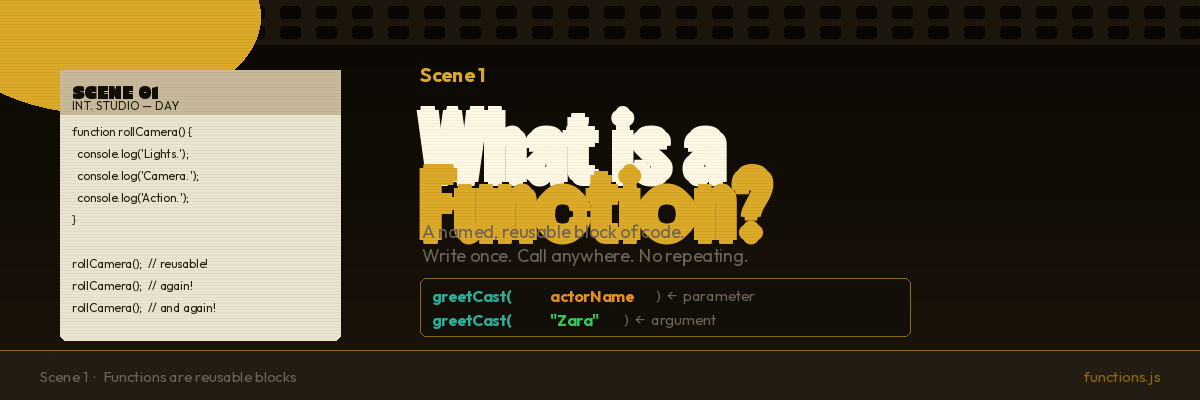
"Now imagine the director calls action three hundred times during a shoot. You don't retype the word three hundred times. You write it once and call it whenever you need it."
He clears the file and types this:
function rollCamera() {
  console.log("Lights.");
  console.log("Camera.");
  console.log("Action.");
}
"That's a function. A named, reusable block of code. You write the instructions once. You call it whenever you need them."
rollCamera(); // Lights. Camera. Action.
rollCamera(); // Lights. Camera. Action.
rollCamera(); // Lights. Camera. Action.
Three calls. One definition. No repetition.
"Functions also take inputs," Madhav adds.
function greetCast(actorName) {
  console.log("Welcome to the set, " + actorName + "!");
}

greetCast("Zara");   // Welcome to the set, Zara!
greetCast("Dev");    // Welcome to the set, Dev!
greetCast("Madhav"); // Welcome to the set, Madhav!
The thing in the parentheses — actorName — is called a parameter. It's a placeholder. When you call the function, you pass in a real value (called an argument). The function uses that value to do its work.
"And they can return things," Madhav adds:
function addBudget(a, b) {
  return a + b;
}

const totalBudget = addBudget(500000, 250000);
console.log(totalBudget); // 750000
return sends a value back to whoever called the function. addBudget(500000, 250000) evaluates to 750000, which gets stored in totalBudget.
That's the foundation.
A function:
Has a name (usually)
Takes zero or more inputs (parameters)
Does something
Optionally returns a value
Now here's where it gets interesting.
Two Ways to Create a Function
Madhav leans back.
"There are two ways to write functions in JavaScript. Most beginners learn one and never wonder about the other. But they behave completely differently — and if you don't know why, you'll hit that error you just saw over and over."
He opens a new file:
// Way 1: Function Declaration
function director(scene) {
  return "Directing scene " + scene;
}

// Way 2: Function Expression
const actor = function(scene) {
  return "Acting in scene " + scene;
};
"Same result when you call them, different rules for everything else."
He points at director. "That's a function declaration. The word function comes first. It has a name. No variable needed."
He points at actor. "That's a function expression. The function gets created and assigned to a variable. The function itself has no name — the variable actor is what you use to call it."
Both work the same when called:
console.log(director(3)); // Directing scene 3
console.log(actor(3));    // Acting in scene 3
Same output. But watch what happens when you change the order.
The Director Who Was There Before Day One
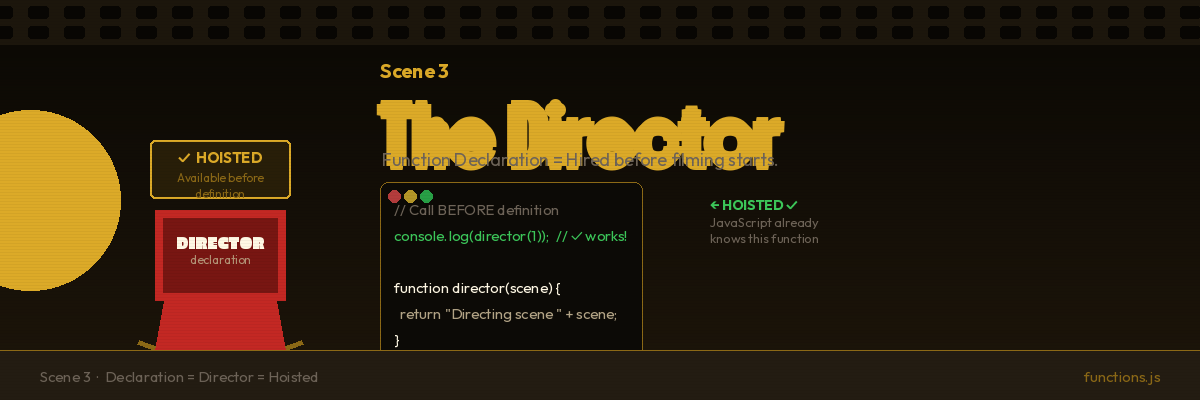
// Call BEFORE the definition
console.log(director(1));

// Definition comes AFTER
function director(scene) {
  return "Directing scene " + scene;
}
"What does this print?" Madhav asks.
The function is defined below the call. That should crash, right?
You type it into the console. Run it.
Directing scene 1
It works.
"That's hoisting," Madhav says. "And this is why I use the movie metaphor."
Before a film starts shooting, the studio locks in the director. The director's name is on the call sheet, on the poster, in the contracts — before a single frame is filmed. The director exists from the very beginning of the project.
Function declarations work exactly the same way. When JavaScript loads your file, before it runs a single line of code, it scans the entire file and registers all function declarations. By the time your code starts executing line 1, director already exists in memory — full function, ready to call.
This is hoisting. The declaration is "hoisted" — registered — before execution begins.
So when line 1 calls director(1), JavaScript already knows what director is. It was registered in the scan phase. No error.
// How JavaScript thinks about your code after hoisting:
// [Phase 1 — SCAN]: function director registered ✓

// [Phase 2 — EXECUTE]:
console.log(director(1)); // director already exists — works perfectly
// ...
function director(scene) { return "Directing scene " + scene; }
Your code doesn't physically move. But the function was registered before execution started. That's all hoisting means.
The Actor Who Doesn't Exist Yet
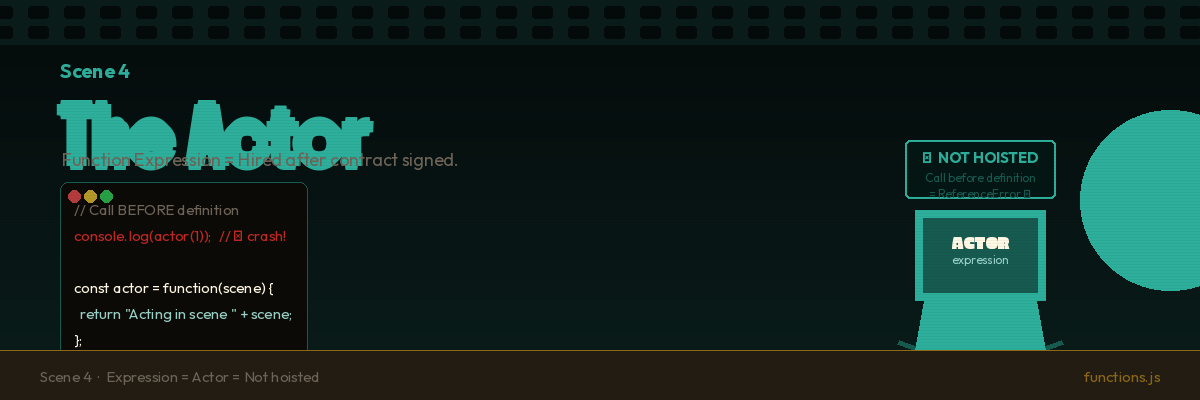
// Call BEFORE the definition
console.log(actor(1));

// Definition comes AFTER
const actor = function(scene) {
  return "Acting in scene " + scene;
};
"Same structure. What happens?"
You already have a feeling. You run it.
ReferenceError: Cannot access 'actor' before initialization
There it is. The exact error from the start of the story.
Madhav nods. "That's your freelance actor."
A freelance actor doesn't exist on the studio's payroll until you call their agent and sign a contract. Before that moment, they're nobody to the studio. You can't put them on the call sheet for a shoot that happens before you've hired them.
Function expressions follow the same rule. The variable actor is declared with const — which means it does not get registered with a value during the scan phase. It exists in memory as a locked, empty binding (called the "temporal dead zone") until JavaScript actually executes the line that assigns the function to it.
When line 1 tries to call actor(1), JavaScript hasn't reached the assignment yet. The binding exists but has no value. Crash.
// How JavaScript thinks about your code:
// [Phase 1 — SCAN]: actor exists as a const binding — but has NO value

// [Phase 2 — EXECUTE]:
console.log(actor(1)); // actor has no value yet — ReferenceError 💥

const actor = function(scene) { // NOW actor gets its value
  return "Acting in scene " + scene;
};
The line that creates the function expression is the exact moment the actor gets hired. Not a frame before.
The Side-by-Side Test
"Run this yourself," Madhav says. "Predict each output before you look."
// === BEFORE DEFINITIONS ===

console.log(typeof director); // Line A — your prediction?
// console.log(typeof actor); // (skip this — it crashes with const)

// === DEFINITIONS ===

function director(scene) {
  return "Directing scene " + scene;
}

const actor = function(scene) {
  return "Acting in scene " + scene;
};

// === AFTER DEFINITIONS ===

console.log(typeof director); // Line B — your prediction?
console.log(typeof actor);    // Line C — your prediction?
Write down your three predictions. Then run it.
Here's what you get:
"function"   ← Line A: director, BEFORE its definition. Already a function.
"function"   ← Line B: director, AFTER its definition. Still a function.
"function"   ← Line C: actor, AFTER its definition. Now it exists.
Line A and Line B are identical. director was a function before you ever see the definition in the file — because it was registered in the scan phase.
actor only exists in Line C — after the expression line runs.
💡 Mental shortcut:
Every time you see a function call, ask yourself: "Declaration or expression?"
Declaration = order doesn't matter.
Expression = definition must come first.
That's the whole rule.
What Hoisting Actually Is (No Jargon)
"Wait," you say. "Does hoisting literally move my code?"
"No. That's the most common misconception. Your code stays exactly where you wrote it. Here's what actually happens."
Madhav draws two phases on the whiteboard:
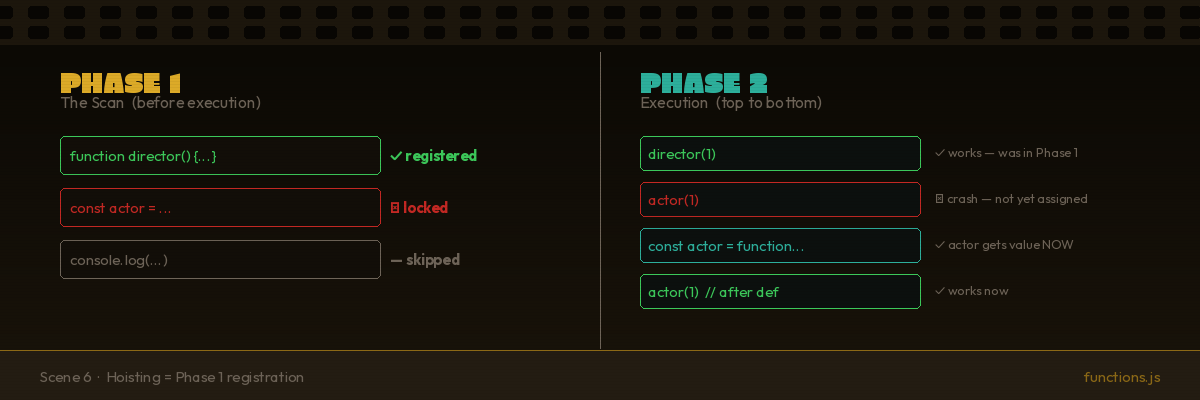
Phase 1 — The Scan (before any code runs)
JavaScript reads your entire file. Every function declaration it finds, it registers in memory — name and full function body. var variables get registered by name (but without a value). const and let get registered but stay locked until their line executes.
Phase 2 — Execution (your code runs top to bottom)
Now JavaScript actually runs your code, line by line. By the time it hits line 1, everything registered in Phase 1 is already in memory.
"Hoisting is Phase 1. That's it. Function declarations are fully available from the start of Phase 2. Everything else has to wait for its line."
| Phase 1 (Scan) | Phase 2 (Execute) | |
|---|---|---|
| Function Declaration | Fully registered ✓ | Available immediately |
Function Expression (const) |
Name locked, no value | Gets value when line runs |
Function Expression (var) |
Name registered as undefined |
Gets value when line runs |
Three Real Situations
Madhav closes the whiteboard and opens his actual codebase.
"Three situations. Which syntax for each?"
Situation 1: A core utility used everywhere
// formatCurrency() is called all over this file,
// including near the top before it's defined.
Use a function declaration.
When a function is a core utility that other parts of the file depend on, a declaration lets you organize the file in whatever reading order makes sense — not the order JavaScript needs things to load.
function formatCurrency(amount) {
  return "$" + amount.toFixed(2);
}
Situation 2: A function passed directly as an argument
const seniorCrew = crewList.filter(function(member) {
  return member.yearsOnSet >= 5;
});
Use a function expression.
When you're passing a function directly as an argument — to .filter(), .map(), .forEach(), etc. — you're creating it inline. It doesn't need a name. A function expression (or arrow function) fits perfectly here.
Situation 3: A function that changes based on a condition
let processScene;

if (isNightShoot) {
  processScene = function() {
    return "Using night lighting rig.";
  };
} else {
  processScene = function() {
    return "Using standard lighting.";
  };
}
Use a function expression.
You can't safely assign a function declaration conditionally (the behaviour varies across environments). If a function should only exist under certain conditions, assign it to a variable using an expression.
Arrow Functions — A Quick Look
"One more thing before you go," Madhav says. "You're about to see this syntax everywhere."
// Regular function expression
const greetCast = function(name) {
  return "Welcome, " + name;
};

// Arrow function — same thing, shorter
const greetCast = (name) => {
  return "Welcome, " + name;
};

// Even shorter — single return expression
const greetCast = (name) => "Welcome, " + name;
Arrow functions (=>) are a type of function expression. Same hoisting rules: they must be defined before they're called, no exceptions.
The one real difference — this works differently inside arrow functions. But that's a future scene. For now, treat them as shorthand for function expressions and apply the same rules.
The Comparison Table
| Function Declaration | Function Expression | |
|---|---|---|
| Syntax | function name() {} |
const name = function() {} |
| Needs a name | Yes — required | No — usually anonymous |
| Hoisted? | Yes — fully | No |
| Available before definition? | ✓ Yes | ✗ No |
| Safe in conditionals? | ✗ Not reliably | ✓ Yes |
| Works as callback? | Awkward | ✓ Natural fit |
| Best for | Named, reusable utilities | Callbacks, conditionals, assignments |
The Assignment
Madhav drops three tasks. The studio's in pre-production and there's real code to write.
Task 1: Write Both Types
Write a function that multiplies two numbers — once as a declaration, once as an expression.
// Declaration version
function multiply(a, b) {
  // your code
}

// Expression version
const multiplyExpr = function(a, b) {
  // your code
};

console.log(multiply(6, 7));      // Should print: 42
console.log(multiplyExpr(6, 7));  // Should print: 42
Both should produce the same result. The point isn't the math — it's getting comfortable writing the same logic two different ways.
Task 2: The Hoisting Experiment
Copy this code exactly. Before you run it, write down what you think each console.log will print. Then run it and check.
console.log(sayAction()); // Line A — your prediction?

// (Don't try to call sayCut here — it will crash. Why?)

function sayAction() {
  return "Action!";
}

const sayCut = function() {
  return "Cut!";
};

console.log(sayAction()); // Line B — your prediction?
console.log(sayCut());   // Line C — your prediction?
If any prediction was wrong, write one sentence explaining why the code behaved differently than you expected. That sentence is the whole lesson.
Task 3: Pick the Right Tool
For each scenario below, decide: declaration or expression? Write the function and include a comment explaining your reasoning. There's no single right answer for syntax — but there is a right answer for reasoning.
A function called
calcTaxthat multiplies a price by 0.08. It'll be called throughout a long script, including near the top.A function passed directly into
.map()that doubles every number in an array.A function stored in a variable that changes based on whether a user is marked as an admin or a guest.
What's Next
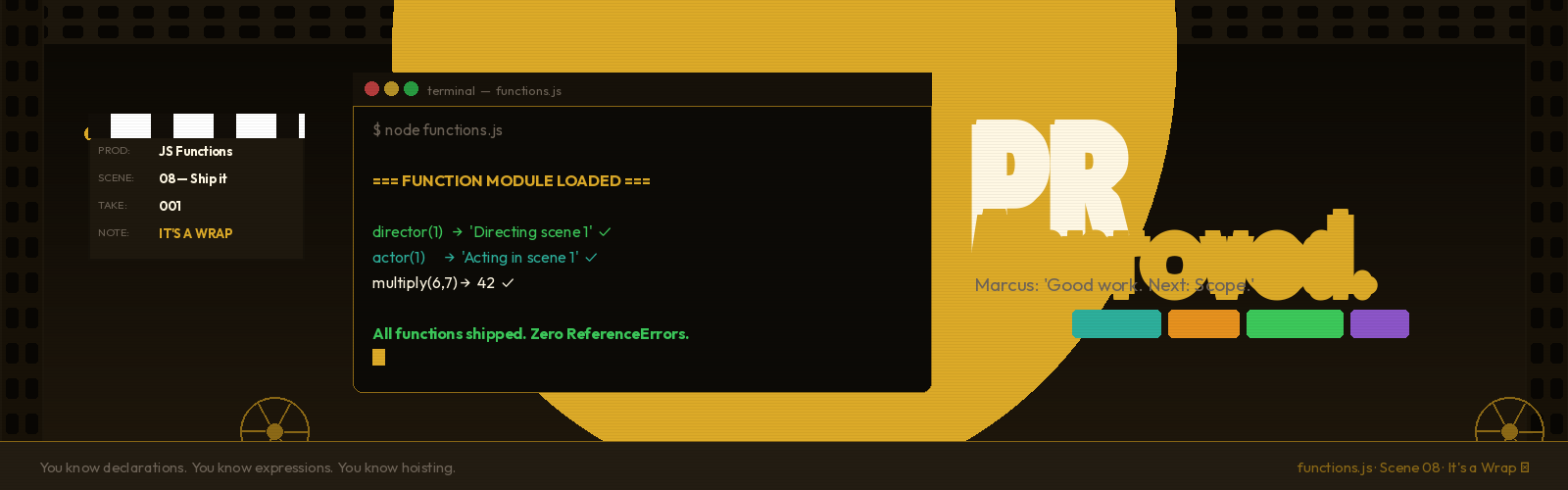
You ship the first module. Marcus approves the PR in under ten minutes.
He adds one comment before merging:
"Good work. Next up: scope. Your functions are talking to variables they shouldn't know about. We need to fix that before the codebase turns into a mess."
Scope is where functions get weird — where you'll understand why variables inside a function stay inside, why global variables are dangerous, and why the same variable name can mean completely different things in different parts of your code.
But that's the next scene.
For now: you know what a function is, you know two ways to write one, you understand exactly why one can exist before its definition and one can't, and you know how to choose between them.
The director is on set. The contract is signed. Ship it.