Arrow Functions in JavaScript: A Simpler Way to Write Functions
The day JavaScript gave developers a shortcut for writing functions.

Turning chai into code and ideas into full-stack applications. Sharing lessons from my development journey, one commit at a time.
The Sticky Note That Replaced Half My Code 🗒️
It's your third week at the company.
Not a design agency — a product startup. Your tech lead Shreya has a habit of explaining code through everyday objects. Staplers, coffee cups, whiteboards. Last week she explained closures using a lunchbox. You didn't fully get it then. But today she's going to use something so obvious you'll wonder why nobody ever told you this before.
You're staring at a callback function you just wrote. It works. But Shreya is looking at it the way a teacher looks at a student who got the right answer using the wrong method.
const doubled = numbers.map(function(n) {
  return n * 2;
});
She pulls her chair over, reads it for two seconds, and says:
"You wrote a full employment contract just to double a number. This isn't HR. Use a sticky note."
You have no idea what that means. Yet.
What This Blog Will Teach You
By the time you finish this, you won't just know the syntax. You'll understand why arrow functions exist, what problem they solve, and exactly when to use them.
Concepts you'll understand:
What arrow functions are and the exact problem they were built to solve
Basic arrow function syntax — and how to read it at a glance
How parameters work: zero, one, and many
The difference between implicit and explicit return — and why it trips everyone up
The one dangerous gotcha with returning objects
How arrow functions compare to regular functions in practical terms
Skills you'll actually build:
Converting any regular function into an arrow function in under ten seconds
Choosing between implicit and explicit return without guessing
Using arrow functions fluently inside
.map(),.filter(), and.reduce()Spotting the object literal trap before it bites you
What you won't need: Anything beyond basic JavaScript variables. If you know what const and console.log do, you're ready.
What you will need: A code editor or browser console, and the habit of typing every example yourself before reading the explanation. The moment something surprises you is the moment it actually sticks.
The Problem With Writing Full Contracts
Shreya opens a blank file. She types this:
const numbers = [1, 2, 3, 4, 5];

const doubled = numbers.map(function(n) {
  return n * 2;
});

console.log(doubled); // [2, 4, 6, 8, 10]
"This works," she says. "But look at it. You're writing a full function — the keyword, the braces, the return statement — just to say multiply by two. You're drafting an employment contract for someone whose entire job is to double a number."
She pauses.
"What if I told you the whole thing could be one line?"
She rewrites it:
const doubled = numbers.map(n => n * 2);

console.log(doubled); // [2, 4, 6, 8, 10]
Same result. One line. No function keyword. No return. No curly braces.
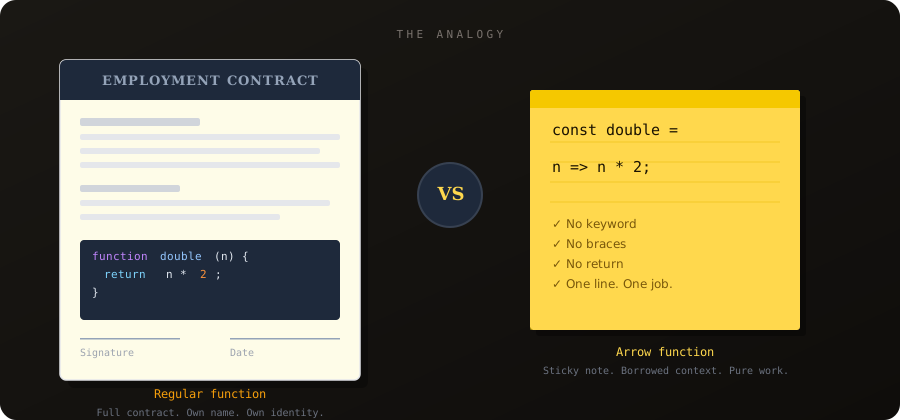
"That," Shreya says, pointing at n => n * 2, "is a sticky note. Short message. Does one job. Gets out of the way."
What Exactly Is an Arrow Function?
Arrow functions are a shorter syntax for writing functions, introduced in ES6 (2015). They use the => symbol — the fat arrow — which is where the name comes from.
They didn't invent anything new. They didn't add new capabilities. What they did was remove the ceremony around writing small, single-purpose functions. And since most functions you write inside callbacks and array methods are small and single-purpose — that ceremony was adding up.
Before ES6, every function — no matter how trivial — looked like this:
function double(n) {
  return n * 2;
}

// or as an expression:
const double = function(n) {
  return n * 2;
};
After ES6:
const double = n => n * 2;
Four words became five characters. The function didn't change. Only the noise around it did.
💡 Think of it this way: A regular function is a full employment contract — name, job description, terms and conditions. An arrow function is a sticky note. It doesn't have its own identity. It just says what to do. And most of the time, a sticky note is exactly what you need.
The Syntax — Reading the Arrow
Shreya draws this on her whiteboard:
const  add  =  (a, b)  =>  a + b  ;
  │     │         │     │    │
  │     │         │     │    └── what the function does (the body)
  │     │         │     └─────── the arrow — separates params from body
  │     │         └───────────── the inputs (parameters)
  │     └─────────────────────── the name you use to call it
  └───────────────────────────── storing it in a variable
"Read it left to right," she says. "You're storing something called add. It takes a and b. The arrow says 'here's what happens next.' And what happens next is a + b. That's the whole function."
She calls it:
add(3, 7);  // 10
add(10, 5); // 15
Works exactly like any other function. The arrow is just how you write it.
The Three-Stage Transformation
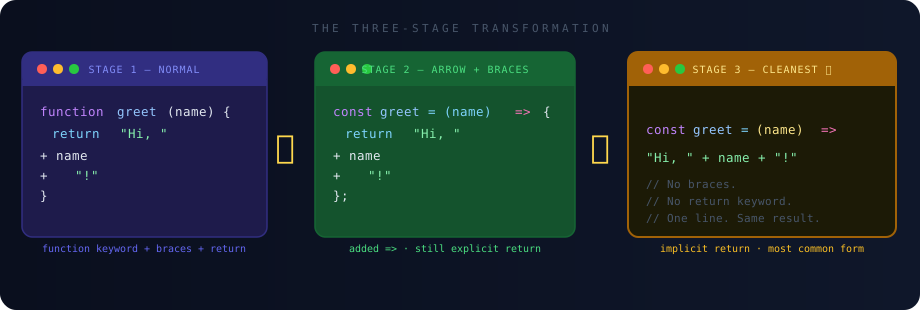
"Let me show you how to convert any function," Shreya says. "Three stages. Watch."
Stage 1: She starts with a regular function:
// Stage 1 — Normal function
function greet(name) {
  return "Welcome to the team, " + name + "!";
}
Stage 2: Remove the function keyword. Assign it to a variable. Add the arrow.
// Stage 2 — Arrow form, still explicit
const greet = (name) => {
  return "Welcome to the team, " + name + "!";
};
Stage 3: Since the body is a single expression, drop the braces and the return keyword entirely.
// Stage 3 — Cleanest form
const greet = (name) => "Welcome to the team, " + name + "!";
greet("Priya");  // "Welcome to the team, Priya!"
greet("Arjun");  // "Welcome to the team, Arjun!"
All three produce identical output. Stage 3 is what you'll see in every modern codebase. Once you can read it, you'll wonder why Stage 1 ever felt necessary.
Parameters — Zero, One, Many
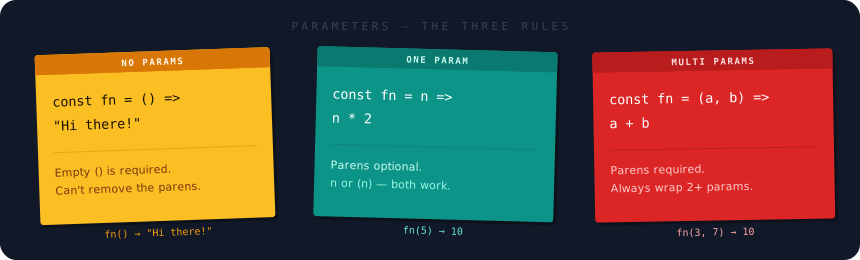
Think of parameters like the message written on the sticky note. "Take a name." "Take two numbers." "No input needed, just do this." The number of inputs changes how you write the arrow function — but only slightly.
No parameters — use empty ()
When the function takes no input, you still need the parentheses. They can't disappear entirely.
const sayAction = () => "And... action!";
const getYear   = () => 2025;

sayAction(); // "And... action!"
getYear();   // 2025
One parameter — parentheses are optional
With exactly one input, you can drop the parentheses around it. Both forms are valid.
// Without parens — works fine
const square = n => n * n;

// With parens — also works fine
const square = (n) => n * n;

square(4);  // 16
square(9);  // 81
Team habit: Most style guides and tools like Prettier default to always keeping parentheses — even for one param. It's more consistent, and when you later add a second parameter you won't forget to add the parens. Pick one style and stick with it across a project.
Multiple parameters — parentheses are required
Two or more inputs always need the parentheses. No shortcuts here.
const add      = (a, b) => a + b;
const multiply = (a, b) => a * b;
const fullName = (first, last) => first + " " + last;

add(3, 7);                   // 10
multiply(4, 5);              // 20
fullName("Shreya", "Mehta"); // "Shreya Mehta"
Implicit Return — The Part That Trips Everyone
Shreya refills her coffee and comes back.
"This is the part where most people get confused," she says. "Not because it's hard. Because nobody explains what's actually happening."
She writes two functions that do the same thing:
// Version A
const double = (n) => {
  return n * 2;
};

// Version B
const double = (n) => n * 2;
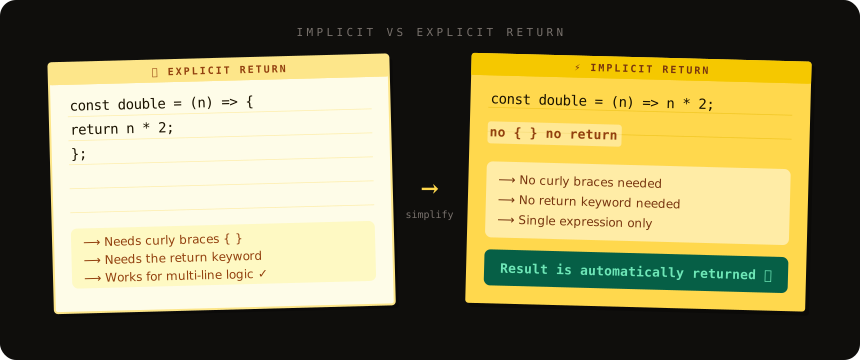
"Version A has braces and a return keyword. That's called explicit return — you're spelling it out. Version B has neither. That's implicit return — the value is returned automatically."
"The rule is simple: if your function body is a single expression — one thing that evaluates to a value — you can drop the braces and the return. JavaScript will return it for you."
const square  = (n) => n * n;          // implicit — returns n * n
const isEven  = (n) => n % 2 === 0;    // implicit — returns true or false
const greet   = (n) => `Hi, ${n}!`;    // implicit — returns a string

square(5);      // 25
isEven(4);      // true
greet("Dev");   // "Hi, Dev!"
When implicit return doesn't work
The moment your function needs more than one line — a local variable, a condition, multiple steps — you go back to explicit return with braces.
// This breaks — you can't declare variables in an implicit return
const process = (n) => const result = n * 2; return result; // SyntaxError

// Use explicit return for multi-line logic
const process = (n) => {
  const result = n * 2;
  return result;
};
💡 Mental model: No braces means "this single expression is the answer." Braces mean "I'm doing multiple things in here — I'll tell you what to return."
The Object Gotcha — Read This Twice
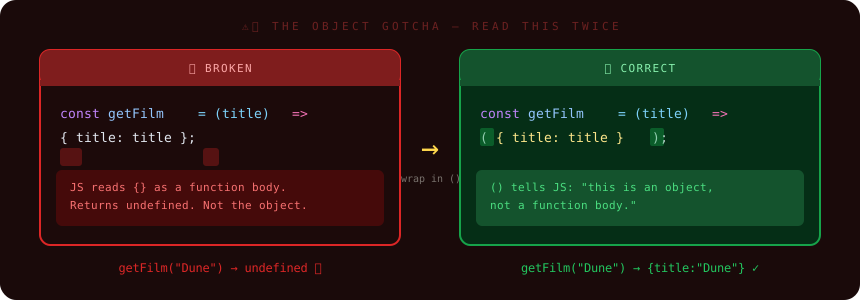
Shreya puts her coffee down and looks directly at you.
"This one gets everyone at least once. I'm telling you now so it doesn't get you."
You want to write a function that returns an object:
const getFilm = (title) => { title: title, released: 2026 };
Looks fine. You run it. You get undefined.
"JavaScript sees those curly braces and thinks you're opening a function body," Shreya says. "Not an object. So it tries to parse title: title as a labeled statement — not a property — and returns nothing."
The fix: wrap the object in parentheses. That tells JavaScript — "these braces are an object, not a body."
// Broken — JS reads {} as a function body
const getFilm = (title) => { title: title, released: 2025 };
getFilm("Dune"); // undefined

// Correct — () wraps the object literal
const getFilm = (title) => ({ title: title, released: 2025 });
getFilm("Dune"); // { title: "Dune", released: 2025 }
⚠️ The rule: Returning an object with implicit return? Always wrap it in
(). Always.
Arrow Functions vs Regular Functions
"They're not identical," Shreya says. "Arrow functions exist because regular functions have one specific behavior that causes headaches — the this keyword. We'll get into that in a future session. For now, here's the practical difference table."
| Regular Function | Arrow Function | |
|---|---|---|
| Syntax | function name() {} |
const name = () => {} |
Has its own this |
Yes | No — borrows from surrounding scope |
| Can be used as constructor | Yes | No |
| Hoisted? | Yes | No |
| Best for | Named utilities, class methods | Callbacks, short operations |
| Implicit return | No | Yes |
The this difference is the only one that will ever cause a real bug. Everything else is style. And for 80% of what you write day-to-day — callbacks, transformations, helpers — arrow functions are the cleaner choice.
Three Real Situations
Shreya pulls up the actual codebase.
"Three situations from the real app we're building. Which form fits each one?"
Situation 1: A helper called throughout the file
// formatRating() is called in six different places across this component
Use a regular function expression — or a declaration if you want hoisting. Arrow functions work here too, but when a function has a meaningful name and is called many times, the distinction matters less than consistency.
const formatRating = (score) => `${score}/10`;

formatRating(8.5); // "8.5/10"
Situation 2: A transformation passed directly into .map()
const films = ["Dune", "Interstellar", "Arrival"];
Arrow function. No question. Short, inline, no name needed.
const upperFilms = films.map(film => film.toUpperCase());
// ["DUNE", "INTERSTELLAR", "ARRIVAL"]
Situation 3: Logic that spans multiple lines
// Function needs to validate input, compute a result, and return it
Arrow function with explicit return. The implicit form can't hold multiple statements.
const calcDiscountedPrice = (price, discount) => {
  if (discount > 0.9) return price; // cap unrealistic discounts
  const saving = price * discount;
  return price - saving;
};

calcDiscountedPrice(1000, 0.2); // 800
The Combination That Powers Modern JS
"Here's the thing about arrow functions," Shreya says. "The reason they exist isn't just to save typing. It's because array methods need functions as inputs. And before arrow functions, passing a function into .map() or .filter() was noisy enough that people avoided it."
She shows you both versions:
const scores = [45, 82, 67, 91, 38, 74];

// Old way — you'd avoid this because it felt heavy
const passing = scores.filter(function(score) {
  return score >= 60;
});

// Arrow way — light enough that you reach for it automatically
const passing = scores.filter(score => score >= 60);
// [82, 67, 91, 74]
// Chain them — this is where it gets powerful
const result = scores
  .filter(score => score >= 60)
  .map(score => score + " ✓")
  .join(", ");

// "82 ✓, 67 ✓, 91 ✓, 74 ✓"
"Arrow functions didn't invent chaining," Shreya says. "They just made it readable enough that people actually do it."
The Quick Reference — Save This
// ─── ZERO PARAMS ─────────────────────────────────
const fn = () => "result";

// ─── ONE PARAM ───────────────────────────────────
const fn = (n) => n * 2;        // recommended
const fn = n => n * 2;          // also valid

// ─── MULTIPLE PARAMS ─────────────────────────────
const fn = (a, b) => a + b;

// ─── IMPLICIT RETURN (single expression) ─────────
const fn = (n) => n * n;

// ─── EXPLICIT RETURN (multiple lines) ────────────
const fn = (n) => {
  const doubled = n * 2;
  return doubled + 1;
};

// ─── RETURNING AN OBJECT — wrap in () ────────────
const fn = (x) => ({ value: x });

// ─── INSIDE ARRAY METHODS ────────────────────────
[1, 2, 3].map(n => n * 2);           // [2, 4, 6]
[1, 2, 3].filter(n => n > 1);        // [2, 3]
[1, 2, 3].reduce((sum, n) => sum + n, 0); // 6
The Assignment
Shreya drops her chair back to her desk and slides a sticky note across to you. Three tasks. Written on paper. Intentionally.
Task 1: The Three-Stage Conversion
Start with this normal function. Rewrite it as an arrow function — once with explicit return, once with implicit return. All three should produce the same output.
// Stage 1 — start here
function calcArea(width, height) {
  return width * height;
}

// Stage 2 — arrow, explicit return
const calcArea = // your code

// Stage 3 — arrow, implicit return
const calcArea = // your code

console.log(calcArea(6, 4)); // Should print: 24 (all three times)
Task 2: The Implicit Return Experiment
Copy this exactly. Before you run it, predict what each line will print. Then run it and check.
const triple  = (n) => n * 3;
const isOdd   = (n) => n % 2 !== 0;
const welcome = (name) => ({ user: name, loggedIn: true });

console.log(triple(7));        // Line A — your prediction?
console.log(isOdd(9));         // Line B — your prediction?
console.log(welcome("Priya")); // Line C — your prediction?
If Line C surprised you — write one sentence explaining why the () around the object is necessary. That sentence is the lesson.
Task 3: The Array Challenge
Given this array of film scores:
const scores = [55, 82, 40, 91, 67, 78, 35, 88];
Using only arrow functions:
Filter to scores above 60 only
Multiply each passing score by 1.1 (a 10% bonus)
Round each result to the nearest whole number using
Math.round()
Write it as a single chain. Expected output: [90, 100, 74, 86, 97]
const finalScores = scores
  // your code here

console.log(finalScores); // [90, 100, 74, 86, 97]
What's Next
You rewrite the original callback. One line. You show it to Shreya.
const doubled = numbers.map(n => n * 2);
She nods without looking up from her screen.
"Now do the same for the filter and the reduce. And don't use a single
functionkeyword. They're all sticky notes."
You fix them in four minutes. The PR goes up. Marcus comments:
"Good. Next: you've got arrow functions inside arrow functions and no idea what
thisrefers to anymore. We need to talk about scope and context."
Scope and context are where JavaScript stops being intuitive and starts being exact. Where you'll understand why a function can access variables it shouldn't be able to see, why this inside an arrow function is never what you expect, and why fixing one bug by guessing will create two more.
But that's the next note.
For now: you know what an arrow function is, you know how to write it in every form, you understand implicit and explicit return without guessing, and you know about the object trap before it ever trips you.
The sticky note is on the wall. Ship it.
Found this useful? Share it with someone who's still writing function keyword callbacks inside every .map(). They'll thank you.
Tags: #javascript #es6 #webdev #beginners #programming